Showing posts with label notepad tricks. Show all posts

Saturday, 31 August 2013

0 HOW TO INCREASE COMPUTER'S SPEED USING NOTEPAD..!!


Hello friends, now I am going to share how you can increase speed of your pc using notepad. No need of download any external software. No need any software to wipe free space. You have to just follow some simple steps to make your computer faster..


STEP 1:

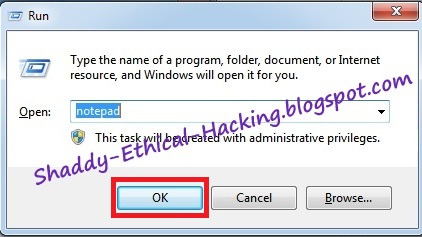
First of all open NOTEPAD in your computer. WINDOW + R and then type NOTEPAD


STEP 2:


Now copy and paste given code in notepad

mystring=(80000000)


STEP 3:

Save this file as anyname.vbe [e.g BoostUp.vbe] on your desktop


STEP 4:

Now you'll get below type of icon on your desktop


11-11-2012+19-13-13

STEP 5:

Now whenever you feel your computer is slow just click on that icon which I mentioned in 4th Step.
That's It..


Enjoy the trick... And Wait for the next..!!

IF YOU FACE ANY PROBLEM THEN FEEL FREE TO COMMENT ...!!


YOUR COMMENT MOTIVATES ME TO POST MORE 
TRICKS..!


Like us on Facebook : Ethical Hacking.

Thursday, 25 July 2013

0 Notepad As Diary log..!!

Diary log

This little trick is very good and easy to use.

Just open up notepad and type :


.LOG

Then save it as whatever you want to call it, close it, and re-open it, and you will have a diary entry, telling you the date and time. Type your entry/message, save it, and the next time you open it, it will be there...!!


Enjoy the trick... And Wait for the next..!!


IF YOU FACE ANY PROBLEM THEN FEEL FREE TO COMMENT ...!!


YOUR COMMENT MOTIVATES ME THAT TO POST MORE AND MORE TRICKS..!


  Like us on Facebook : Ethical Hacking.

0 Notepad Trick Message popups..!!

This tricks will be done in notepad which is the text editor that is included in nearly all windows machines.

Remember, most scripts will either have a '.vbs' or a '.bat' file extension, don't forget to add them on when saving the file.

So, to open notepad, just hit start>all programs> accessories>Notepad

or type in the CMD 'start notepad.exe'

Message popups

This is a cool trick, that can get really irritating to unsuspecting friends.

in notepad, type, or copy and paste this :


do
MsgBox "your text here"
loop  

This code will bring up a message pop up, saying whatever you type into the script.

I have put 3 message boxes before it loops back to the start, but you can put as many as you want, simply by adding more of the line in the script. Make sure that you put it before 'loop' though.
Here is and Example :

Now go to File >> Save As >> "name of the file.vbs"

*Note* = Type the name of the file without quotes and .vbs is compulsory..!!


Enjoy the trick... And Wait for the next..!!


IF YOU FACE ANY PROBLEM THEN FEEL FREE TO COMMENT ...!!

YOUR COMMENT MOTIVATES ME THAT TO POST MORE AND MORE TRICKS..!


  Like us on Facebook : Ethical Hacking.