Showing posts with label PC TRICKS. Show all posts

Saturday, 31 August 2013

0 HOW TO INCREASE COMPUTER'S SPEED USING NOTEPAD..!!


Hello friends, now I am going to share how you can increase speed of your pc using notepad. No need of download any external software. No need any software to wipe free space. You have to just follow some simple steps to make your computer faster..


STEP 1:

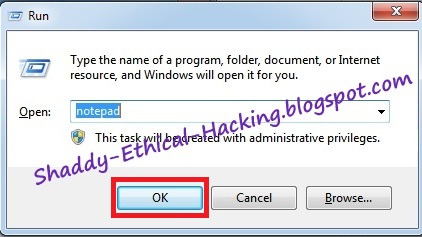
First of all open NOTEPAD in your computer. WINDOW + R and then type NOTEPAD


STEP 2:


Now copy and paste given code in notepad

mystring=(80000000)


STEP 3:

Save this file as anyname.vbe [e.g BoostUp.vbe] on your desktop


STEP 4:

Now you'll get below type of icon on your desktop


11-11-2012+19-13-13

STEP 5:

Now whenever you feel your computer is slow just click on that icon which I mentioned in 4th Step.
That's It..


Enjoy the trick... And Wait for the next..!!

IF YOU FACE ANY PROBLEM THEN FEEL FREE TO COMMENT ...!!


YOUR COMMENT MOTIVATES ME TO POST MORE 
TRICKS..!


Like us on Facebook : Ethical Hacking.

Monday, 26 August 2013

5 WINDOWS 8 ACTIVATOR ALL VERSION..!!

Hi friends, today I'm going to share with you WINDOWS 8 ACTIVATOR FOR ALL VERSION..


CLICK ON THE DOWNLOAD BUTTON (BELOW) TO

 DOWNLOAD THE ACTIVATOR..!!

INSTRUCTIONS 

STEP 1 : Right Click ==> Run as administrator. 

STEP 2 : Wait for the process and don't do nothing

STEP 3 : It restarts automatically

STEP 4 : Congratulation.!! Windows is "Activated"


Features
=================================
Unlocked :
  1. Personalization
  2. Start screen,
  3. Account Picture
NOTE YOU WILL ALSO BE PROVIDED WITH PERSONALIZATION ENABLER CRACK WITHIN THE FOLDER + INSTRUCTION TO ACTIVATE IT..


Enjoy the trick... And Wait for the next..!!


IF YOU FACE ANY PROBLEM THEN FEEL FREE TO 


COMMENT ...!!


YOUR COMMENT MOTIVATES ME TO POST MORE 


TRICKS..!


Like us on Facebook : Ethical Hacking.


Friday, 21 June 2013

5 HOW TO CREATE YOUR LAPTOP OR PC AS WiFi HOTSPOT..IN WINDOWS 7.

In this tutorial I'll teach You :

 ' How to use your pc/laptop net on your WiFi enable cellphone...'

or

' How to turn your laptop/pc into a wifi hotspot...'


JUST FOLLOW FOLLOW FEW SIMPLE STEPS AND YOU'RE DONE..

NOTE ~ MAKE SURE THAT YOU HAVE INSTALLED ALL THE NECESSARY WLAN DRIVERES AND YOUR WIRELESS NETWORK CONNECTION IS ENABLED
(IF USING DELL LAPTOP PRESS Fn + F2 TO ENABLE IT)
AND THEN PROCEED......


STEP 1.


                 Take your cursor on the network icon then right click on it and go to property
                  (as shown in below screenshot).


                    or if you don't have that network icon then open control panel from start menu or click here
                    then search for "Network and Sharing Center" and open.


STEP 2.

                   Click on "Manage wireless networks" (as shown by the below screenshot)


STEP 3.
      
        Click on "Add" (as shown by the below screenshot)


STEP 4.
     
                Then Click on "create an ad hoc network" (as shown by the below screenshot)


STEP 5.

                   Click "Next" (as shown by the below screenshot)


STEP 6.

                  If you want to create a personal wifi sharing hotspot then enter your hotspot name
                  with "WPA2-Personal" security type selected and enter the security key.
                  (as shown in screenshot)


                  NOTE ~ A security key contains the following details (as shown in screenshot) ..


                  NOTE ~ DON'T CHECKED THE "Save this network"..


OR 


If you want to create an open network just select "No Authentication (open)"


You will get message something like this, Just 
"Turn On Internet Connection Sharing"


   YOU'RE DONE (now search for that wifi network on your cellphone and enjoy)..!!

IF FACE ANY PROBLEM DON'T FORGET TO COMMENT ...!!

Don't Forget to share.... 

Follow on Facebook : Ethical Hacking.

Friday, 14 June 2013

0 HOW TO ENABLE TELNET IN WINDOWS 7,8.

Generally by default telnet is deactivated in windows 7 and windows 8. So if you want to enable it, here is the procedure...

STEP 1.

Open control panel (Press Windows+R and enter control panel as shown in Below screenshot).


STEP 2.

Navigate to "Programs and features" and open it (as shown in Below screenshot).


STEP 3.

click on " Turn windows features on or off 


STEP 4.

Enable TELNET (as shown in Below screenshot).


STEP 5.

Enjoy..!!


IF FACE ANY PROBLEM DON'T FORGET TO COMMENT ...!!

Don't Forget to share.... 

Follow on Facebook : Ethical Hacking.

0 WATCH FULL STAR WARS MOVIE IN COMMAND PROMPT.

DID YOU KNOW THAT YOU CAN WATCH FULL STAR WARS MOVIE IN COMMAND PROMPT.
JUST FOLLOW SOME SIMPLE STEPS..


STEP 1.
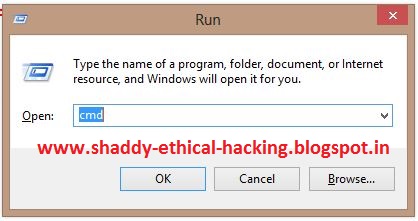
Open command prompt (Press Windows+R and enter cmd as shown in Below screenshot)


STEP 2.
Type TELNET & hit enter (How to enable telnet in windows 7,8, click here)


after typing telnet u'll see something like this


STEP 3.
Enter o

STEP 4.
Now TYPE towel.blinkenlights.nl & hit ENTER.


STEP 5. 
Enjoy full movie


IF FACE ANY PROBLEM DON'T FORGET TO COMMENT ...!!


Don't Forget to share.... 

Follow on Facebook : Ethical Hacking.

Sunday, 17 February 2013

0 HOW TO MAKE Keyboard LED's Dancing

This is a Small Trick And doesn't effect your system at all..
Try This and Enjoy..


STEP I .  

                         Open Notepad.

STEP II .

                       paste the following thing in your notepad
 

Set wshShell =wscript.CreateObject("WScript.Shell")
do
wscript.sleep 100
wshshell.sendkeys "{CAPSLOCK}"
wshshell.sendkeys "{NUMLOCK}"
wshshell.sendkeys "{SCROLLLOCK}"
loop


STEP III .
                  Now save the file with the name of dancing.vbs

STEP IV .
                    Now open the file and see effect.!


To Stop The Effect just follow these simple Steps..
 

STEP I .

                  Open task manager my pressing ctrl+alt+del simultaneously


STEP II .


                  Now look for "Microsoft Windows Based Script host" (if u r in windows 7 or windows 8)


else search for "Wscript".


Step III .
                   End that task.

                      Enjoy....!


IF FACE ANY PROBLEM DON'T FORGET TO COMMENT ...!!

Don't Forget to share.... 

Follow on Facebook : Ethical Hacking.

Sunday, 19 August 2012

0 HOW TO MAKE BOOTABE CD/DVD

Hiiii Friends in this post I’ll describe how to make a bootable operating system (OS) CD/DVD ….

Things u’re gonna need are as follows :

1. Blank CD/DVD (depending upon the OS, for win)
2. CD/DVD writer
3. Windows OS files
4. Ultra Iso software 
(full version recommended)

(FOR THOSE WHO HAVE .ISO FILE OF WIN7 , JUST MOUNT IT VIA DAEMON TOOL OR ANY VIRTUAL DRIVE SOFTWARE LIKE POWER ISO, MAGIC ISO. etc AND THEN FOLLOW THE STEPS)

The steps are simple and very easy , just download and install Ultra Iso (for full version click here) and install it in your machine , then follow simple steps below :


STEP 1.

  Open Ultra Iso , it will look somewhat like this :


STEP 2.

 Now Drag and Drop windows files here :


Now select for DVD (4.7 GB)


Now After Extract It will look somewhat like this :


Now Download a Boot File (For Windows 7 click here and for Windows XP click here) and keep the file on the Desktop.


STEP 3.

 Now Click on "Bootable tab"


And Then "Load Boot File..."


Now Browse The Content and Click on Desktop :


Now Scroll Down and select the boot file and click open :

 
now select the burning icon like this :


For safe successful and perfect burning select this speed and then click on burn :


And Wait for the process to complete...!!

AFTER COMPLETION RESTART THE MACHINE (KEEPING THE DISC INSIDE) AND ENJOY..!!...

I hope I have made everything clear to you guys...
I have tried to make as easy as possible ... so please guys comment and share..!!


IF FACE ANY PROBLEM DON'T FORGET TO COMMENT ...!!

Don't Forget to share.... 

Follow on Facebook : Ethical Hacking.